
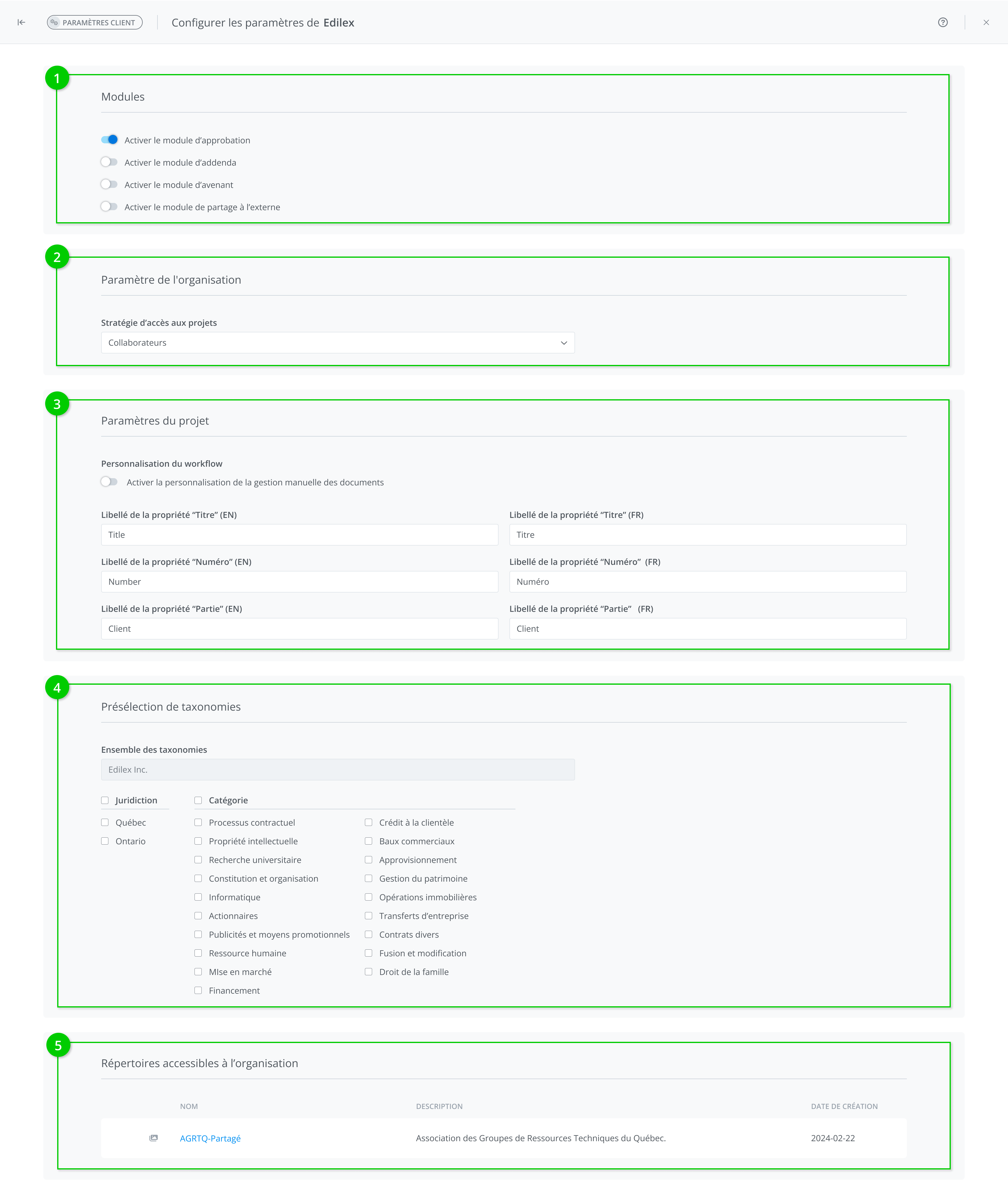
It is possible for a system administrator to set default client parameters. The window is divided into five sections: modules, organization settings, project parameters, taxonomy preselection, and repositories accessible to the organization.
-
The Modules allows the following elements to be activated:
-
Enable approval module
-
Enable addenda module
-
Enable amendment module
-
Enable external sharing module
-
The Organization Settings section allows you to choose the following element:
-
Project access strategy (organization wide or collaborators)
-
The Project parameters section allows you to modify the label of the following project properties:
-
Label of the project title
-
Label of the project number
-
Label for the project client/applicant
Modifying the labels of project properties has consequences in several places on the platform, such as: the project list, project properties, project reports, and sharing email notifications.
-
The Taxonomy preselection section allows you to select the following elements:
-
Taxonomy set
-
Taxonomy values
-
La section Repositories accessible to the organization displays the following elements:
-
Name of the organization
-
Description of the organization
-
Date organization was created